


Poke Genie -Remote Raid IV PvP
4.740.45K Reviews
App Specs
- Version
- 8.17.0
- Updated On
- License
- Free
- Downloads
- 10,000,000+
- Developer
- Poke Genie
- Categories
- Tools
- Platform
- Android, iOS
Screenshots
 Analysis by AppCompare
Hey fellow trainers! If you're anything like me, diving into the world of Pokémon GO is all about leveling up and conquering those epic raids. Enter Poke Genie, an app that's become my trusty sidekick in navigating the complex landscape of Remote Raids and PvP battles. Let's take a stroll through its features and why it's worth a spot on your home screen.
How quickly it helps with everyday decisions
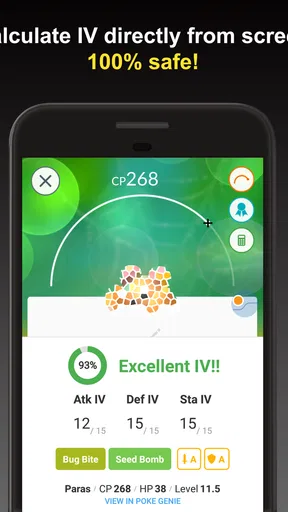
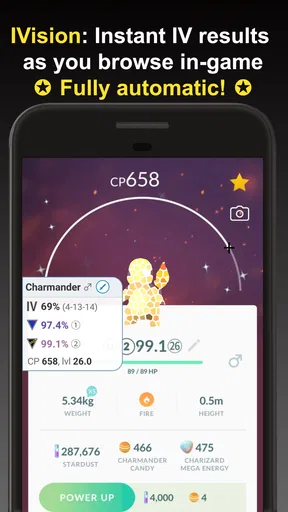
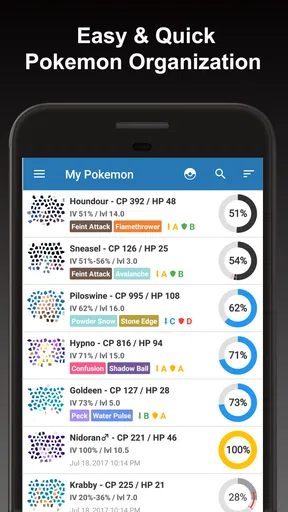
The clearest time-saver is the way an IV check turns a vague question—“Is this catch worth keeping?”—into something I can act on. Rather than comparing Pokémon by guesswork, I can inspect the scan and use the resulting IV estimate to decide whether to keep, transfer, or take a closer look. It is a small step, but it matters when I have several catches to sort through after a long play session.
I also like that the tool’s usefulness does not depend on being a raid regular. A player who mostly catches Pokémon on a walk can use the same appraisal workflow to build a more deliberate collection. For raids or PvP, the extra stats and move information offer a quick reference before I spend time or in-game resources on a choice. The benefit is informed decision-making, not an automatic shortcut to winning.
What happens during busy sessions
Some sessions put several tasks close together: checking a newly caught Pokémon, deciding what to prepare for a battle, and trying to join a raid before the opportunity passes. Poke Genie is most valuable in that kind of stop-and-check routine, where I want focused information without turning every decision into a research project. I can use it between game actions, then return to Pokémon GO with a clearer plan.
There is a trade-off, though. A screenshot-based scan is another step, and it depends on capturing the relevant game screen cleanly. If I am in a hurry or juggling a conversation while playing, I may prefer to make a quick in-game decision instead of opening another app. The smoother workflow comes from using the tool selectively, not scanning everything just because I can.
Reliability depends on the task
For individual Pokémon checks, the appeal is that the app helps interpret information already visible in the game rather than asking me to maintain a separate record by hand. That makes it practical for routine collection management. I still treat its recommendations as guidance: what counts as useful depends on whether I care more about raids, PvP, or simply keeping a Pokémon I like.
Raid coordination is a different kind of experience because it involves other players and timing. The coordinator can help organize a group, but it cannot make everyone available at the same moment or guarantee that a particular raid fits my schedule. I get the most from it when I can be flexible and follow the app’s process, rather than expecting an instant match every time I open it.
Worth Reading Before You Choose

EA SPORTS FC Mobile 26 Is a Bigger Football Game, but It Takes Time

Flipboard Shows What News Apps Must Do Beyond the Feed

Switching to Android Auto Means Rethinking Your Driving Routine

Google Calendar Makes a Crowded Week Easier to Manage

Ludo King Makes the Most of the Minutes Between Plans

Baby Panda World Brings Quick Play to Modern Phones, but Its Game Library Feels Busy
Device fit and setup expectations
Poke Genie is a tools app from developer Poke Genie, and it is rated for Everyone. It is free to install, with optional in-app purchases; the listed purchase range runs from $2.99 to $47.99 per item. Its current version is 8.14.5, and it supports Android starting with version 6.0. The app has a 4.7 average from around 516,000 ratings, with more than 10 million installs, which gives new users a useful sense of how widely it is used.
For the basic workflow, expect to move between Pokémon GO and the helper rather than treating them as one combined screen. That is convenient when I am checking a few catches, but less appealing if I want every detail in one place. If your phone is older or already feels crowded during play, I would try the free experience first and see whether switching between apps feels comfortable before considering any optional purchase.
Who will get the most from it
I would recommend it most to players who regularly weigh IVs, prepare for PvP, or want help arranging remote raids. It also suits returning players who know the basics but feel rusty about how to evaluate a catch or prepare a team. The separate tools let me focus on one question at a time, which is less overwhelming than trying to learn every battle detail at once.
A casual player who rarely raids, never looks at PvP, and is happy choosing Pokémon by appearance may not need it. The main game already covers the essentials for simply catching and playing, so another app can feel like extra admin if its analysis does not change your decisions. I would skip it if you want Pokémon GO to stay completely uncomplicated; I would try it if you enjoy making collection choices with more context.
A realistic example: after an evening walk, I might have several new catches and only a little time before putting my phone away. I can check the most promising ones rather than scan the entire batch, note which deserve another look, and leave the rest alone. If a raid or PvP session is on my mind, I can then use the relevant planning tools instead of treating every Pokémon as equally important. That selective approach is quicker and keeps the app from becoming a second chore.
How it compares with ordinary alternatives
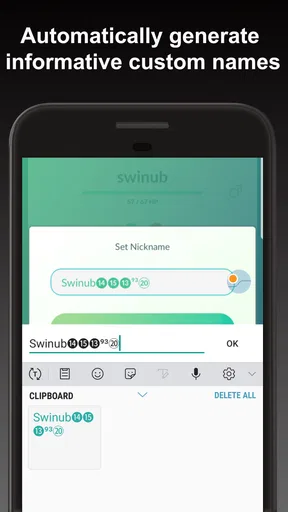
The usual alternative is to rely on Pokémon GO’s own screens and make judgments from what they show, or to search online whenever I forget how a stat or matchup affects a decision. Those options are enough for casual play and avoid switching apps. Poke Genie is more useful when I want several kinds of support—IV assessment, battle preparation, raid coordination, name generation, and Pokédex tools—in one companion. The trade-off is that an all-in-one helper has more to explore than a simple calculator, so I would learn only the tools I actually need.
One practical tip is to settle on a clear purpose before opening it: evaluate a catch, prepare for PvP, or look for raid coordination. That keeps the session focused and makes it easier to judge whether the app is saving effort. Another is to use its analysis as a filter, not a command. A high or promising appraisal does not automatically make a Pokémon the right choice for every team, and personal favorites can be worth keeping even when competitive numbers are not the priority.
Getting Started with Poke Genie
First things first, downloading Poke Genie is a breeze. Available on both Android and iOS, this app is designed to make your Pokémon GO life a whole lot easier. Once you've installed it, you can dive straight into its user-friendly interface. No need to fumble around—we've all been there!
The app kicks off with a quick setup, connecting effortlessly to your Pokémon GO account. It’s like having a personal assistant that knows exactly what you need, without you having to spell it out. And trust me, the magic happens when you start exploring its features.
Your Personal Pokémon Assistant
One of the standout features is the IV calculator. For those who aren't familiar, IVs (Individual Values) determine how strong your Pokémon can get. With Poke Genie, you can effortlessly scan and calculate IVs by taking screenshots. It’s like having insider knowledge on your Pokémon’s potential!
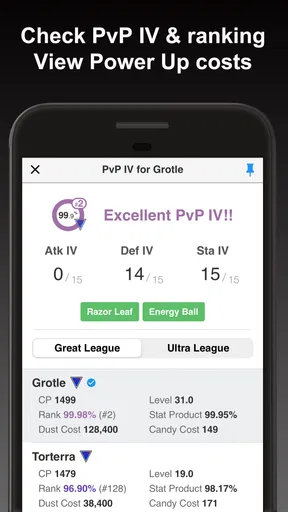
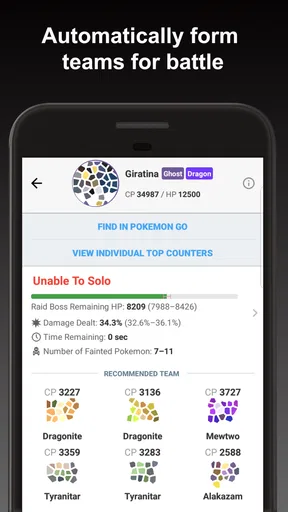
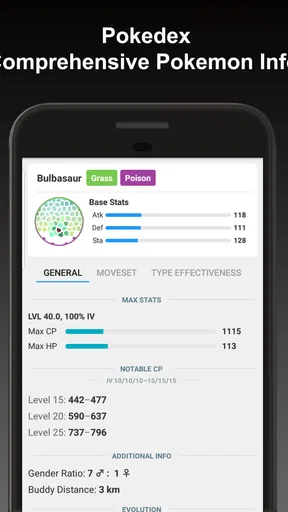
But that’s just the tip of the iceberg. The app also offers a comprehensive breakdown of each Pokémon’s stats and possible moves. So, if you're prepping for a raid or a PvP match, you can strategize like a pro. It’s all about maximizing your Pokémon’s abilities, and this app has got you covered.
Mastering Remote Raids
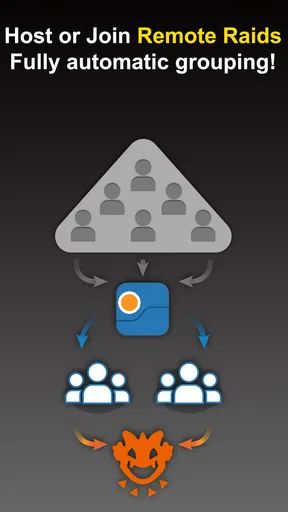
Remote Raids have changed the game for Pokémon GO, allowing players to join raids from anywhere. But coordinating them can be a hassle. Enter Poke Genie’s Raid Coordinator, a feature that blew me away. It connects you with other trainers globally, so you can join or host raids with ease.
The app lets you set your preferences, like which Pokémon you’re targeting and your availability. It’s a bit like matchmaking for raids—smooth and efficient. No more endless searching or waiting around; Poke Genie lines everything up effortlessly.
Leveling Up Your PvP Game
For the competitive souls out there, PvP battles are where the adrenaline kicks in. Poke Genie steps up to the challenge with its PvP ranking tool. It helps you analyze your Pokémon’s performance in battles, suggesting optimal movesets and team compositions. It’s like having a coach who’s always got your back!
And if you’re ever in doubt about which Pokémon to evolve or power up, the app’s insights are invaluable. It’s not just about winning; it’s about smart play, and this app helps you make those strategic decisions.
The Community Vibe
Aside from its technical prowess, what really elevates Poke Genie is its community aspect. The Raid Coordinator feature doubles as a social hub, where you can connect with trainers worldwide. Sharing tips, strategies, and even making new friends—it’s all part of the experience.
Plus, the app is regularly updated based on user feedback. It’s like having a direct line to the developers, ensuring the app stays relevant and in tune with the gaming landscape.
Is It Worth It?
So, is Poke Genie worth your time? Absolutely! Whether you’re a casual player or a hardcore trainer, this app has something for everyone. It's the ultimate companion for maximizing your Pokémon GO experience, taking the guesswork out of the game.
In a nutshell, Poke Genie is more than just an app; it’s a game-changer. With its intuitive features, community interaction, and strategic insights, it’s like having a Pokémon GO guru in your pocket. Don’t just take my word for it—download it, give it a whirl, and watch your gameplay transform!
My performance verdict
In day-to-day use, I see this as a focused companion rather than something that needs to stay open throughout a whole play session. Its strongest performance benefit is reducing the mental work around appraising catches and preparing for battles; it is less compelling when I only want to open Pokémon GO and play without interruptions. Because the main workflows involve checking information or coordinating with other players, perceived speed can vary with how quickly I move through those steps and, for raids, with the group’s timing.
I would start with a few practical tasks rather than importing every possible habit into the app: check a small set of catches, explore the PvP analysis when a battle is actually planned, and use raid coordination when I have time to participate. That makes it easier to notice whether the extra context is useful on your device and whether switching between apps feels natural. The free starting point lowers the commitment, while optional purchases are something I would consider only after identifying a specific feature I use often.
Overall, Poke Genie makes the most sense for trainers who enjoy understanding why one Pokémon suits a particular purpose better than another. It combines several Pokémon GO support tools in one place, but it does not remove the need to make your own choices or to work around the timing of other players. If analysis and planning are part of the fun for you, I would give it a try; if the extra steps feel like admin, the game’s own tools may be enough.
Pros
- Comprehensive raid coordination tool.
- Accurate IV calculator for Pokémon.
- User-friendly interface design.
- Supports multiple languages.
- Includes PvP matchup analysis.
Cons
- Some features require in-app purchases.
- Occasional connectivity issues.
- Limited offline functionality.
- Ads can be intrusive at times.
- Relies heavily on user-generated data.
FAQs for Poke Genie -Remote Raid IV PvP
What is Poke Genie and what features does it offer?
Poke Genie is a comprehensive companion app for Pokémon GO players. It provides features such as IV calculations, a PvP IV calculator, and a remote raid coordination tool. Users can scan Pokémon data directly from their device, making it easy to optimize their teams and participate in remote raids efficiently.
Is Poke Genie safe to use with Pokémon GO?
Yes, Poke Genie is designed to be safe and compliant with Niantic’s terms of service. It doesn’t require logging into your Pokémon GO account, and it uses screen scanning technology to read your Pokémon data. This ensures that your account remains secure while using the app’s features.
How does the remote raid feature work in Poke Genie?
The remote raid feature in Poke Genie allows players to join raids from anywhere in the world. Users can host or join raids by entering a queue system, which manages raid invitations and ensures fair participation. This feature is particularly useful for accessing raids that are not locally available.
Does Poke Genie support all Pokémon GO updates?
Poke Genie is regularly updated to support the latest features and changes in Pokémon GO. The developers are committed to maintaining compatibility with the game’s updates, ensuring that users can always access accurate IV calculations and other essential tools without interruptions.
Is Poke Genie available for both Android and iOS devices?
Yes, Poke Genie is available for download on both Android and iOS platforms. It provides a similar user experience across both operating systems, allowing players to take advantage of its features regardless of their device. Links for downloading the app can be found on our website.


